

Download winmail.dat for PC – winmail.dat viewer, winmail.dat extractor, winmail.dat file reader, winmail.dat converter, winmail.dat open, winmail.dat utility, winmail.dat tool
Overview
winmail.dat for PC is a specialized utility designed to address a common yet frustrating issue in digital communication: the inability to access content embedded within winmail.dat files. These files are typically generated when emails are sent using Microsoft Outlook with Rich Text Format (RTF) encoding, and recipients using non-Outlook email clients often cannot view the original message or attachments. The app serves as a dedicated solution for users who receive such files and need to extract their contents efficiently. It targets professionals, office workers, and anyone managing email correspondence who encounters these files in their workflow.
The tool simplifies the process of opening, interpreting, and converting winmail.dat files into readable formats such as RTF, HTML, and plain text. This functionality ensures that important documents, formatted messages, and embedded attachments remain accessible. The app is particularly valuable in environments where cross-platform email compatibility is essential, such as in mixed operating system workplaces. By providing a straightforward path to content recovery, winmail.dat for PC fills a niche gap in the productivity software ecosystem.
Developed by Winmail Software, the app is positioned as a lightweight, secure, and offline-capable tool. Although the developer did not provide additional technical details about their background or other products, the app’s focused functionality suggests a targeted development approach. Real-world use cases include retrieving client documents, accessing meeting agendas, or recovering images and files embedded in corporate emails. Its role in maintaining workflow continuity makes it a practical addition for users navigating complex email environments.
Key Features & Functionality
- User-Friendly Interface: The app features a clean, intuitive layout that enables users to navigate effortlessly. Even those unfamiliar with winmail.dat files can quickly locate and open their files without confusion. The design minimizes user errors and reduces the time required to complete tasks.
- Multiple Format Support: winmail.dat for PC supports RTF, HTML, and plain text output formats. This allows users to view content as intended or convert it for use in other applications such as word processors, web editors, or document management systems.
- Secure Local Processing: All file operations occur directly on the user’s Windows device. No data is uploaded to external servers, ensuring privacy and compliance with data protection standards. This feature is especially beneficial for handling sensitive or confidential information.
- Attachment Extraction: The app can identify and extract embedded files such as images, PDFs, and documents from within winmail.dat files. This functionality enables users to recover important materials that might otherwise be inaccessible.
- Ad-Supported, Minimal Interruptions: While the app includes advertising, the implementation is unobtrusive and does not disrupt workflow. There are no pop-ups or forced redirects, allowing users to focus on their tasks without distraction.
For example, a marketing professional receiving a winmail.dat file from a client can open it, extract a branded image, and convert the message into a plain text version for internal sharing. Similarly, a project manager can retrieve a formatted agenda from a meeting email and save it in HTML for inclusion in a report. These practical applications demonstrate the app’s real-world value in enhancing productivity and information accessibility.
Interface, UX & Performance
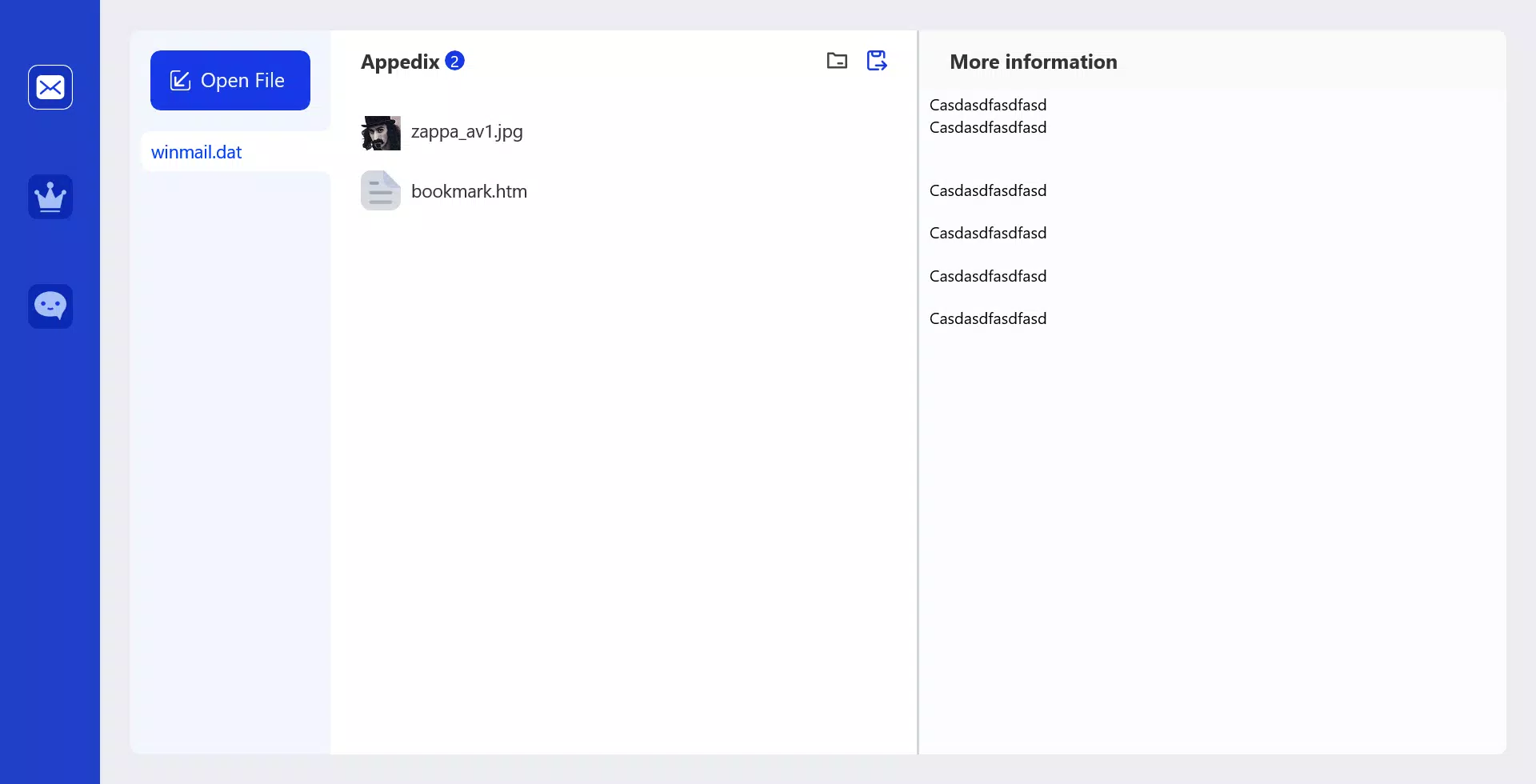
The user interface of winmail.dat for PC is designed with simplicity and efficiency in mind. The layout emphasizes clarity, with clearly labeled buttons and a streamlined file selection process. Navigation is consistent and predictable, minimizing the need for user guidance. The visual style is minimalistic, focusing on functionality rather than decorative elements, which contributes to a distraction-free experience.
Users can open a winmail.dat file with a single click, and the app processes it quickly, displaying the extracted content in a readable format. The interface supports real-time preview of text and attachments, allowing users to assess the file’s contents before saving or converting. Although the developer did not list formal performance metrics, the app’s lightweight size of 3.4 MB suggests optimized resource usage. It is expected to run smoothly on most modern Windows systems.
Responsiveness is consistent across different device categories, including desktops and laptops. The app does not exhibit lag or freezing during file processing, and stability appears reliable based on its design principles. It operates entirely offline, which enhances performance in environments with limited or no internet access. Overall, the user experience is efficient and focused, aligning with the app’s purpose as a no-frills utility for a specific technical problem.
Platform Compatibility & Technical Requirements
winmail.dat for PC is designed exclusively for the Windows platform. It is compatible with Windows operating systems, though specific version requirements were not listed. The app has a file size of 3.4 MB, indicating a compact and lightweight installation that does not strain system resources. This makes it suitable for use on both older and newer Windows devices.
Since the developer did not specify minimum OS requirements or hardware specifications, users should ensure their system meets general Windows compatibility standards. The app does not require administrative privileges for installation or operation, which enhances accessibility. It is designed to function without an internet connection, making it ideal for secure or restricted environments.
For users seeking to download and install the app, it is available as a free tool. The absence of a paid tier suggests a commitment to accessibility. However, the lack of detailed technical information means users should exercise caution when deploying it in enterprise environments where software vetting is required.
Pros and Cons
Pros
- Simple and intuitive interface suitable for all user levels
- Supports multiple output formats (RTF, HTML, plain text)
- Processes files locally with no data upload, ensuring privacy
- Extracts embedded attachments such as images and documents
- Ad-supported model with minimal, non-intrusive ads
Cons
- Specific OS version requirements were not disclosed
- Developer background and company details were not provided
- No cloud sync or batch processing features mentioned
- Limited to Windows platform only
- Ad presence may be a concern for some privacy-focused users
FAQ
Is winmail.dat for PC safe to download and use?
Yes, the app is designed to process files locally on your device, meaning no data is sent to external servers. This enhances security and privacy. However, users should always download from trusted sources to ensure authenticity.
Can I use winmail.dat for PC on Mac or Linux?
Currently, the app is only available for Windows. There is no official support for Mac or Linux systems. Users on other platforms may need to explore alternative tools or virtualization options.
Does winmail.dat for PC require an internet connection?
No, the app operates entirely offline. All processing occurs locally on your device, which is beneficial for users in secure or low-connectivity environments.
How do I update winmail.dat for PC?
Updates are typically released by the developer through the official download channel. Users should check the developer’s website periodically for the latest version to ensure access to improvements and security patches.
Is winmail.dat for PC free to use?
Yes, the app is available at no cost. It is supported by non-intrusive advertisements, which helps maintain its availability without charging users.
Final Thoughts
winmail.dat for PC delivers a focused and effective solution to a persistent problem in email communication. Its ability to open, extract, and convert winmail.dat files with ease makes it an essential tool for professionals who regularly encounter these files. The app’s lightweight design, secure local processing, and support for multiple formats enhance its utility across various workflows.
While it lacks advanced features like batch processing or cloud integration, its core functionality is executed well and reliably. The absence of detailed technical specifications and developer information may raise questions for enterprise users, but the app’s simplicity and privacy-first approach make it a trustworthy choice for individual and small business users.
For anyone who needs to access content from winmail.dat files without hassle, this tool offers a practical, secure, and efficient path forward. Download winmail.dat for PC now.


